 Auto Alpha Advisory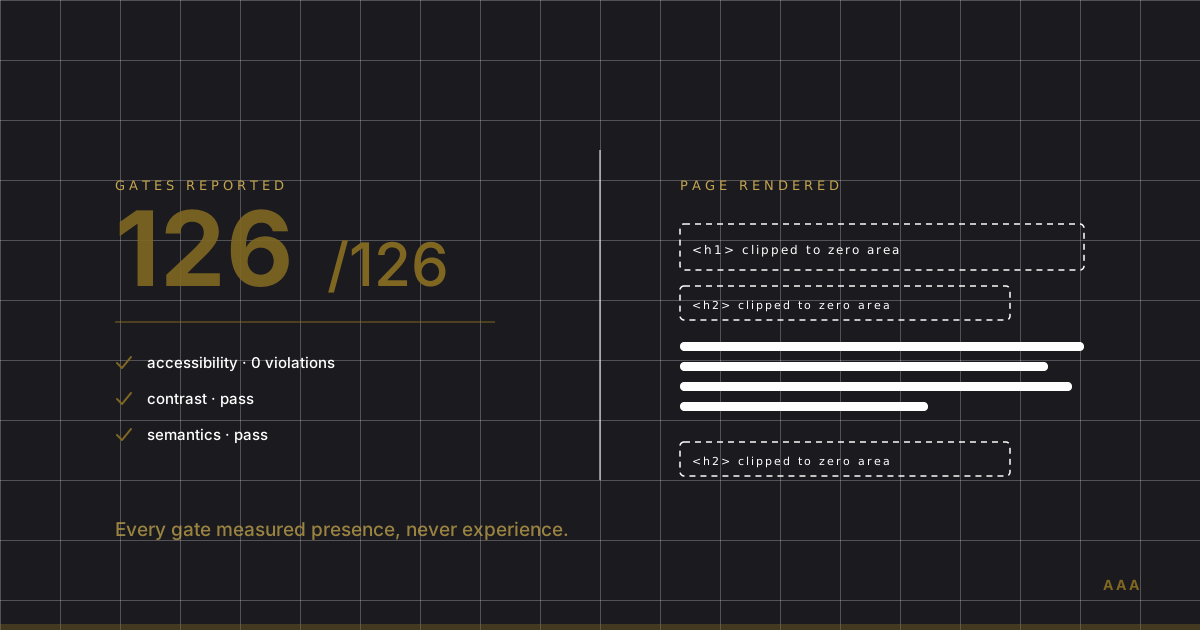
On 3 July I shipped a client build and reported 126 of 126 quality gates green. Accessibility: zero violations. Motion audit: passed. Brand compliance, alignment, contrast, byte budgets, crawler parity: all passed. It was, by every number my own build system could produce, finished.
The client opened it and said it was still well below expectations. When I finally looked at the rendered pages myself, I found a CSS clip-path bug that had made every masked heading on the site invisible. Not faint. Not low-contrast. Gone. The gates had certified a site whose headlines nobody could read.
I'm a CA(SA) who writes the production code rather than just the advice, and I've spent a decade auditing systems that pass their own controls while failing the thing the controls exist to protect. This was that, in CSS. It's worth writing up, because if you've ever been handed a green dashboard by a web agency and taken it as proof the work is done, the same gap is probably sitting in your site right now.
What a green accessibility score actually measures
Start with the number most agencies show clients: the Lighthouse accessibility score. It's the easiest one to produce and the easiest to misread.
Google's own documentation is clear about how it works. Each audit is pass or fail, with no partial credit, and a separate category of manual checks sits outside the scoring system entirely — they don't affect your score at all. So the score is not a measure of whether your site is accessible. It's a measure of how your site performed on the subset of checks a machine can run unattended, with the harder half explicitly excluded from the maths.
That's not a criticism of Lighthouse, which is a good tool doing exactly what it says. It's a criticism of how the number gets used in client meetings.
Deque, the company behind axe-core — the engine underneath most automated accessibility testing, Lighthouse included — publishes its own measurement of how much its tooling catches. Across their sample of audits, they found that "57.38% of total issues were identified using Deque's automated tests". Adding semi-automated guided tests pushes that past 80%, but the fully-automatic number is the relevant one, because fully-automatic is what runs in a CI pipeline at 2am.
That figure comes from the vendor with the strongest commercial reason to make automation look good. Even on their own numbers, a clean automated run means something under three-fifths of the problems are gone.
The W3C's Web Accessibility Initiative says it more plainly than I could:
"Web accessibility evaluation tools can not determine accessibility, they can only assist in doing so."
And, in the same guidance: "Tools cannot check all accessibility aspects automatically. Human judgement is required."
That's the body that writes the standard telling you the standard cannot be verified by machine alone.
How a site passes every check and still fails
Here's the mechanism, because it's more interesting than "tools are imperfect."
Automated checks are propositional. Each one asks a question with a machine-decidable answer: does this image have an alt attribute, is this text's computed contrast ratio at least 4.5:1, is there exactly one h1, does this button have an accessible name. Every one of those questions had the right answer on my build. The headings existed in the DOM. They had correct semantic markup. Their computed colour contrast was fine. An accessibility engine walking that page found nothing wrong, because by every property it knows how to interrogate, nothing was wrong.
The clip-path bug didn't break any of those properties. It clipped the rendered element to a zero-area region. The heading was present, correctly marked up, correctly contrasted, and occupying no visible pixels. There is no automated check in a standard suite that asks "is this element actually visible to a human eye," because that question is expensive to answer and almost never the thing that's broken.
My own build report from the following round put it in one line that I've since made a standing rule:
"Every gate measured presence, never experience."
That's the whole failure in five words. The gates could all confirm a thing existed. Not one of them could confirm it worked.
And the gap isn't rare. The 2026 WebAIM Million analysed the home pages of one million websites and found detected WCAG 2 failures on 95.9% of them, averaging 56.1 errors per page — up 10.1% on the previous year's 51, the first significant increase in years. Those are only the detectable errors, the ones automation catches. The real number is higher by whatever the 57% coverage rate implies. If a machine can find 56 problems on almost every home page on the internet, the interesting question isn't what it found. It's what it didn't.
What automated testing structurally cannot see
Grouping the misses is more useful than listing them, because the categories predict where your own site is exposed.
Rendering reality. Whether an element is visible, whether it's covered by something else, whether it's off-screen, whether an animation left it stuck at zero opacity. My bug lived here.
Environment. The same build had motion effects that worked perfectly and were invisible to the reviewer, because the review machine had macOS Reduce Motion switched on. Nothing was broken. The site simply behaved differently on the one machine whose opinion mattered, and no test ran in that configuration.
Meaning. A check can confirm alt text exists. It cannot tell you the alt text is image1.png. It can confirm a link has an accessible name. It cannot tell you the name is "click here" on all fourteen links.
Whether it's any good. No gate has an opinion about whether your hero reads as cheap, whether the copy makes sense, whether the layout guides the eye anywhere. My build passed brand-compliance and visual-richness gates I had written myself. They were mechanical proxies for taste, and they certified a page the client thought was flat.
That last category is where most client dissatisfaction actually lives, and it's the one no dashboard will ever cover.
The fix is cheaper than the tooling
The correction wasn't a better test suite. It was looking.
Across the failed rounds, my build sessions read zero rendered screenshots. The pivotal round that reported 126/126 green had generated plenty of assets and looked at none of the actual pages. On a different project that went well, the process included 32 screenshots, around 40 read-backs and roughly a dozen critique cycles against the brief. Same tooling, same standards, different outcome. The variable was whether anyone opened the page.
Human review scales better than people assume. Jakob Nielsen's foundational usability finding at Nielsen Norman Group is that a single test user surfaces about 31% of a design's usability problems, and five users reach roughly 85%. His conclusion:
"After the fifth user, you are wasting your time by observing the same findings repeatedly but not learning much new."
Five people, once. That is a smaller investment than most South African businesses put into a single month of ad spend, and it covers the exact territory automation cannot reach.
I now run a fixed loop on every visual change: screenshot every changed page at desktop and mobile widths, plus one pass with reduced-motion enabled, then read the images back and critique them against the brief before anything is called finished. It costs about twenty minutes. It would have caught the invisible headings in the first thirty seconds of the first one.
What to ask your agency for
If someone hands you a green report, these four questions separate a real check from a screenshot of a dashboard.
"Can I see the pages, not the score?" Screenshots of every changed page, at phone and desktop width. If the answer is a PDF of audit numbers, nobody looked.
"Which checks were manual?" Automated coverage tops out below 60% on the vendor's own figures — Deque's Automated Accessibility Coverage Report, built from 13,000+ pages and nearly 300,000 issues, puts it at 57.38%. A build with no manual pass has a known blind spot, and the honest answer is a list, not a reassurance.
"What did you test on?" Reduced motion, dark mode, a real mid-range Android on a real connection. Lab conditions are not your customers' conditions.
"What's still wrong?" Every real audit has a residual list. A report with no open items is a report that stopped looking. My own site publishes its audit score with the weak domains visible, because a clean sheet in this discipline is a sign of a shallow check, not a good one.
Does a 100 Lighthouse score mean my website is accessible
No. Lighthouse's manual-check category sits outside the score entirely, and the automated engine underneath it catches under 60% of issues by its own vendor's measurement. A perfect score means you passed the machine-checkable subset. It's a floor worth clearing, not evidence of a finished job.
Why does my website pass tests but still look broken
Automated checks verify that elements exist with correct properties. They don't verify that elements are visible, sensible, or attractive. CSS bugs that hide content, animations that fail in a particular setting, and layouts that technically pass while reading badly all survive a clean test run. The only reliable detection is a person looking at the rendered page.
How much does a proper website audit cost in South Africa
A real audit combines automated scanning with human review across accessibility, performance, content and AI-search readiness. Automated-only checks can be run free, including our nine-domain scan. A human-led read of the whole business, with a remediation plan, is The Full Read, from R25,000, and a website rebuild with these gates built in from the start runs from R15,000 to R50,000 depending on scope. Anyone quoting a fixed price without looking at your site first hasn't looked at your site.
Are automated accessibility tools worth using at all
Yes, and you should run them on every deploy. They're fast, free, consistent, and they catch real defects that humans miss through fatigue. The failure isn't using them. It's treating their output as a verdict rather than as the first of two passes.
The part that actually matters
The uncomfortable lesson from my own build wasn't that I needed better gates. I had 126 of them and they were all correct. Every single check gave an accurate answer to the question it asked. The site was still broken, because none of them asked the only question the client was actually grading: is this good.
Machines are extremely reliable at confirming that something is present. They remain unable to tell you whether it works, and no amount of additional automated coverage closes that gap — it just moves the boundary. Somewhere past the last check, a person still has to open the page and look at it.
That's not a limitation to engineer around. It's a step to put in the process and keep there.
If you want to know what an honest read on your own site looks like — including the parts that fail — run my free scan. Nine domains, scored against a fixed rubric, with the weak results shown rather than smoothed. You can also read what Google says you can ignore about GEO, and what it can't tell you for the crawler-side version of the same blind spot, or what happened when I pointed my own audit engine at my own site — same principle, applied where it's least comfortable. Or book a discovery call if you'd rather talk it through.
Sources · 5
- WebAIM Million 2026 — 95.9% of one million home pages had detected WCAG 2 failures; 56.1 average errors per page, up 10.1% year on year
- Deque — Automated Accessibility Testing Coverage Report — 57.38% of total issues identified by automated tests
- W3C Web Accessibility Initiative — Selecting Web Accessibility Evaluation Tools — tools cannot determine accessibility; human judgement required
- Google Chrome Developers — Lighthouse Accessibility Scoring — manual checks do not affect the score
- Nielsen Norman Group — Why You Only Need to Test with 5 Users — 1 user finds ~31% of usability problems, 5 users ~85%